Laptop Repair Dubai

Laptop Repair Dubai

Fix Laptop Screen Problems with Easy Tips

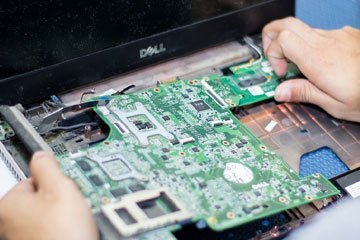
Laptop screens may experience flickering, blackouts, or distorted colors, reducing productivity. Fortunately, You can fix typical laptop screen issues yourself by following these easy steps: Inspect the display settings: To fix difficulties, make sure your display settings are correct: – Right-click the desktop and choose Display settings. Set the appropriate resolution under Scale and layout. – Click Display adapter properties for Display 1 in Advanced display settings. – Confirm that your laptop has the maximum refresh rate available. – Click OK to apply the changes.       2. Display driver update or rollback: Display drivers that are faulty or obsolete may create issues: – Select Device Manager by simultaneously pressing the Windows logo key + X. – Expand the Display adapters tab, and right-click on the display driver. – Select Update driver and update the driver by following on-screen instructions. – To revert the driver, go to Properties, then driver. Follow the steps by clicking Roll Back Driver.      3. Troubleshoot hardware malfunctions: Address any hardware issues that are causing screen problems: – Turn off the laptop and unplug it from the power source. – Connect an HDMI or VGA cable to an external monitor or TV. If your laptop screen is mirrored, it may need to be replaced. If not, double-check the video output port or cable. – If no external monitor is present, conduct a hard reset: – Unplug all gadgets except the keyboard and mouse. – Hold the power button for 15 seconds or until the laptop goes off. – Reconnect the power cord or AC adapter as well as the battery. – Restart the laptop to see whether the screen problem has been addressed. If the above suggestions fail, contact expert Laptop Repair Services in Dubai. Techno Edge Systems LLC provides quick and dependable services at reasonable pricing. They specialize in repairing screens, keyboards, batteries, and motherboards.  Visit www.laptoprepairindubai.ae to schedule an appointment with Techno Edge Systems LLC. Don’t let a broken laptop screen spoil your day. Contact Techno Edge Systems LLC right now to get your laptop restored as soon as possible!

Laptop Repair Dubai

Essential Laptop Tips for Healthy and Safe Usage

Laptops have become indispensable to our life in the current digital era. We depend on these portable devices for various functions, from business to enjoyment. To protect our gadgets’ longevity and safety, it is vital to put laptop safety first. This article will review some crucial advice for safe and healthy laptop usage: Keep Your Environment Clean: It’s crucial to keep your laptop in a spotless environment. The keyboard’s vents and dust, grime, and debris accumulations can cause overheating and poor performance. Regularly clean your laptop with a soft cloth and compressed air to avoid these problems. Prevent Physical Damage to Your Laptop: Purchase a reliable laptop bag or sleeve to shield your device from mishaps like drops and bumps. Do not stack heavy objects on top of your laptop, as this could harm the structural integrity of the device. As they can damage the screen, never close the lid when using pens or other small things on the keyboard. Use safe charging: For laptop safety, using original chargers and power adapters is crucial. Cheap and fake chargers might result in electrical problems that result in severe damage or even fires. Also, do not charge your laptop on a bed or sofa since this can restrict airflow and result in overheating. Use robust passwords to secure your laptop: Using strong passwords for your laptop can safeguard your private and sensitive data. A mix of letters, numbers, and special characters should be used. For an additional layer of security, update your passwords frequently and enable options like two-factor authentication. Despite safeguards, computers occasionally experience problems that call for expert intervention. In such circumstances, it is essential to rely on professional Laptop Repair Services in Dubai. Techno Edge Systems LLC is a reputable company in the field that provides dependable and effective laptop repair services.  Keep in mind that a well-maintained laptop not only operates at peak performance but also safeguards your important data. Use this vital advice to use a laptop safely and healthily, and you’ll have a seamless computing experience. Visit Techno Edge Systems LLC & www.laptoprepairindubai.ae to keep your laptop in peak shape and get any issues fixed quickly. The most excellent treatment for your laptop is due!

Laptop Repair Dubai

Things to Consider While Choosing Laptop Repair Dubai

Since smart devices are one of the essential parts of everyone’s life, almost everybody has owned a laptop. To carry out everyday personal and professional activities, the laptop is an important thing. Usually, people invested a lot of amount in buying a high-end laptop for their everyday use.

Laptop Repair Dubai

What does laptop repair services in Dubai advice?

Things to do when your laptop won’t turn on The following piece of information will entail in what to do when you diagnose your laptop with some troubleshoot or ways to repair your laptops. Laptop repair services in Dubai advise that the hardware is an important part of laptops that are put into daily function. Keeping your laptop to the recent technologies will keep your hardware and laptop healthy. What are the general hardware components that you should be accustomed to a laptop? The general hardware components of a laptop are:- CPU fan:- The CPU fan is generally inserted into the laptop to keep it cool. Heat sink/Heat pipe:- heat pipe or sink help in air circulation in a compressed space to avoid overheating of the laptop. CPU socket:- The socket is used to insert the CPU in it. CPU (core processor unit):- The unit drives the instruction and programs. Hard Drive, CMOS battery, Wireless card and Speakers To store data, you need a hard drive. The wireless card is used in adding wireless options to a laptop. And, finally, speakers function to create a sound that is attached to the motherboard. RAM:- Random Access Memory is present on a laptop so that it can be accessed randomly. Steps to take care and maintenance of the laptop You can hire laptop servicing companies for taking physical and software care of the laptop. To take physical care of the laptop:- 1. You should have different screwdrivers to take off the covering. 2. If you want to test the electricity services on your motherboard, you can take a digital multimeter. 3. It is important to keep your keyboard out of dust. 4. Check if you have an anti-static wristband. The wristband will keep you safe from electricity. Software care for the laptop If you want to take care of software on your laptop, then keep things like a disk management tool, defrag and CHKDSK are important. If you have problems with the hard drive, then use defrags. It will help in defragmenting things like files and folders on a hard drive. It tends to create more optical space and organizes folders uniformly. Miscellaneous issues • If you face overheating of your laptop, then you can use a q-tip to remove the silver area or other parts. • If your laptop is not showing images, then it is quite obvious to check the LEDs. Repairing of the laptop is undermined at an easy level. If you want to avail services related to repairing of the laptop, then you can take down the services of Techno Edge Systems LLC. The service providers are among the best laptop service centers in Dubai. They are easily available using the contact number – +971-54-4653108. You can get the service providers to vide their official address or website address www.laptoprepairindubai.ae.

Laptop Repair Dubai

Tips to Clean Laptop Parts from Dirt and Dust

We all face the issue of having dust and dirt flying around our houses- be it due to pollution, pet hair, construction work around your house or dust storms which are very common in urban areas. However the dust may have accumulated, the fact remains that we need to come up with ways to handle it since our laptops are literal black holes which suck in the dust thanks to the tiny openings for the speakers, gaps between the keyboard keys and the nooks and crannies of other movable parts. This causes issues and makes people search for terms like ‘laptop repair near me’ and laptop repair centers’. A subsidiary of Techno Edge Systems LLC is more than happy to share some tips on how to manage this issue at home. 1. Prevention Is Better Than Cure: This is a logical first step since it will save a lot of hassle in the future. If you try to keep your laptop inside a drawer or cupboard when it is not being used or even place a cloth or some sort of covering upon it, the amount of dust that goes into the small crevices will reduce by a huge amount. This is especially important to do when you are dusting or cleaning your room since a lot of dust will be flying around in confined space and that may entail in it entering the nooks and crannies of your laptop. 2. Start Slowly: The first tip in removing dust from your laptop is to start off by using a soft cloth and gently removing dust from the closed portions, like the top flap, the screen and the handrest in front of the keyboard. If you do not do it gently, again the dust will get disturbed and enter the speaker, mic opening and keyboard. 3. Use a small pump: There are small dust pumps available in the market which are just rubber balls with a small opening at one side when you press these with your hand, the air comes out in a pressurized manner. Hold the opening such that the air stream is about 45 degrees angle to the keyboard and press lightly on it. This will push off the dust from the crevices without forcing it to go inside. If too much pressure is used, the dust could settle further inside which is not our intention. 4. Use a Vaccum cleaner: The above steps will ensure that more than 95% of the dust from your laptop is removed. However, a small amount will remain in hard to reach corners like edges of the keyboard panel, USB ports, CD ROM opening, and speaker. For this, you can use a vacuum cleaner on minimum setting and run it lightly over the affected areas. This will leave your laptop clean from within! Conclusion: While these steps are easy to perform at home, they should be done carefully. However, gradually how much ever careful you are, there will be build up of dust which you cannot reach without opening up the laptop in which case it should be done by laptop repair professionals at www.laptoprepairindubai .ae.

Laptop Repair Dubai

Why Should You Try Restarting Computer Before Heading For Laptop Repair?

The first question the technicians ask when you approach them for a laptop repair is – Have you restarted the computer? More often than not, the most trivial thing to do when your computer hangs is restarting the computer. But, in the process did you ever pause to think why the computer starts working as if there was not a thing wrong with it once you restart it? Let’s see why the computer needs restarting to have the things working for you. At Techno Edge Systems, we offer complete cost-effective Laptop repair in Dubai for minor to major issues within the least turnaround time. Why does your computer need restarting? You must agree that you have a lot of the programs currently running on the computer and it has been many days since you have ever restarted the computer. You must have done many of the following things since you have last restarted the computer like • Installed and uninstalled many programs. • Your internet browser must have been running for days or even months. • Started and stopped many programs. During the course of such things, you leave footprints of all the actions you have performed as you work on the operating system by means of the background processes. These consume a lot of RAM, not to mention the amount of CPU usage. These are the culprits behind the sluggish performance of your computer and ultimately your system hangs. What happens when you restart your computer? When you restart your computer, you are closing down all the processes. All the programs running in the background close down when you reboot the system. And, when the computer actually restarts, you are starting from scratch again, which most of the time will help in faster, and a more effective working computer. Requiring to restarting the computer can be a sign of bigger problem lurking in the background or an imminent laptop repair Needing to restart the computer occasionally when you have updated the drivers or installed the updates, or uninstalled/reinstalled the software is perfectly normal. Or, if it has been a long time since you have restarted the computer and your computer is performing sluggishly, of late. However, needing to restart your computer too frequently could be due to various reasons like a hardware failure, a malware infection or a virus attack. Restarting is a temporary fix You need to bear in mind that restarting a computer is providing a temporary fix rather than a permanent solution. Approaching an authentic laptop repair center near you to attain a permanent solution to your problem rather than deferring it by restarting your laptop is a smart way to deal with laptop repair. For laptop repair in Dubai and for more information contact +971-54-4653108 or visit our website www.laptoprepairindubai.ae.

laptop repair
Laptop Repair Dubai

How to Avoid Laptop Repairs Due to Overheating Issues?

What should you do to avoid overheating the laptop? Should you really keep taking the temperature of our laptop in order to avoid overheating? Trust us, it’s easier than that. But, first things first! We need to first understand what goes behind that hood of the laptop that causes overheating and what the repercussions are. What components in the laptop generate heat? The heat generated by the laptop is due to the electromagnetic movement that takes place in the millions of circuits and the internal resistance that they encounter with each other. In fact, one might not have guessed, but it is the electricity that is the cause behind the heat. Why even the LEDs produce heat. But, as we know the fact that LEDs require minimal electrical energy, they emanate less heat. • The Central Processing Unit (CPU) generates heat as it runs multiple algorithms at the same time • The Graphical Processing Unit (GPU) which is the reason behind the 3D images for display also generates heat. • Gaming causes high generation of the heat as they require GPUs to work like a horse to carry out complicated calculations. In fact, the GPUs are said to generate more heat than the CPUs. • Then, the hard disk drives also generate a large amount of heat essentially when they are copying large files etcetera. • Then, the optical disk drives, which also generate heat especially when running the DVDs as it puts the DVDs/CDs to motion and reads the content using the laser. How to keep the temperature of your laptop in check? As we already said, you don’t actually require a thermometer to keep the temperature of your laptop in check, but watching out for ideal temperature is however essential. The room temperature of 27° C is ideal for the laptop to optimize the performance. Else, the overheating can undeniably affect the functioning of the laptops. How does the laptop deal with the high temperature? The laptops are built to deal with the heat. The computers are fitted with a fan to cool the internal surroundings under the hood. In another step to cool down the overheating laptop, the motherboard instructs the applications running to slow down. In case, the laptop is generating the heat that is off-limits, it will also instruct the laptop to shut down to avoid the blow-up. • Automatic shutdown, causing computers to freeze, minor calculations like as trivial as opening a browser is going wrong and taking too long. • The continuous whirring of the fan is often the symbol of overheating. • Lines are showing up on your laptop. • The laptop abruptly shuts down. • Bottom of the laptop is hot, where the RAM, fan and the battery are located. Things to do to avoid overheating of the Laptop: • Take a break. • Place the laptop on a hard surface. Keeping the laptop on the lap can actually obstruct the air vent and overheats the system further. • Buy a laptop cooler. • Replace the battery if it is discharging too soon. In order to avoid some serious damage to you and your laptop always keep the heat in check. For more information and Laptop Repair in Dubai, contact Techno Edge Systems LLC at 04-2513636 or visit our site: www.laptoprepairindubai.ae.

Scroll to Top